NatalPass · Journal

Reading Your Map · Astrocartography

How to Talk to AI About Your Astrocartography Map


You've Probably Already Tried It

Quick answer: AI cannot accurately calculate astrocartography lines — ask the same question twice and you'll get two different answers. But if you feed it precise data (city, lines + aspects with proximity, your natal placements, and one honest goal), it can interpret like a very good astrologer. NatalPass generates that data-rich prompt in one click.

You opened ChatGPT, typed something like "I have a Venus line through Lisbon, is it a good place for me to live?" — and got back three polite paragraphs that could have been written for literally anyone. Love! Beauty! Harmony! Consider visiting first!

The problem wasn't the AI. The problem was that you asked a stranger a personal question without introducing yourself first. AI is remarkably good at reading astrocartography — when it has your actual data in front of it. Without that data, it hands you the horoscope-column version.

This guide shows what AI actually needs, what to paste in, and how to ask questions that get you real answers instead of mush.

First, a Two-Minute Experiment

Try this:

  1. Open a chat and ask: "Which cities does my Venus AC line pass through?" You'll get a confident, nicely formatted list.
  2. Close the chat. Open a new one. Ask the exact same question — a different list.
  3. Ask Gemini — a third.

Every answer sounds equally certain. Most of them are wrong.

AI chats cannot calculate astrocartography lines — the math requires precise astronomical computation, and language models don't work that way. Ask one directly ("honestly, can you accurately calculate astrocartography lines?") and most will admit it. They just don't volunteer that disclaimer when you ask about Dubai.

So the division of labor is simple:

  • Calculation needs a real astrocartography engine — actual computed lines and aspects for your actual chart. That's what NatalPass does.
  • Interpretation is where AI shines. Give it correct data and it synthesizes lines, aspects, and your natal chart like a top-tier astrologer with infinite patience.

And here's the satisfying proof: take the same NatalPass-generated prompt and paste it into ChatGPT, Claude, and Gemini. The answers suddenly agree — same themes, same warnings, same trade-offs. When the input is real, the hallucination problem disappears.

Why AI Gives You Generic Answers

Ask "what does a Venus line mean" and AI can only recite the textbook version, because four things are missing:

  • The lines near your city — and how close they run. Which type (MC, IC, AC, or DS) and the proximity: a Direct Hit is a main character in your life there; a Somewhat is a background hum. (More in our guide to orbs and distance.)
  • The harmonious aspects nearby. The quiet supporting cast — often the reason a place feels "weirdly easy."
  • The tense aspects nearby. The part people skip, and the part that matters most: the hidden friction that makes a "perfect" city feel inexplicably hard after six months. (See aspects vs. exact lines.)
  • Your natal placements. A Venus line expresses your Venus — its sign, house, and natal aspects. Two people on the same line can have very different experiences.

You could assemble all of this by hand. It used to take a determined evening. Now it takes one click.
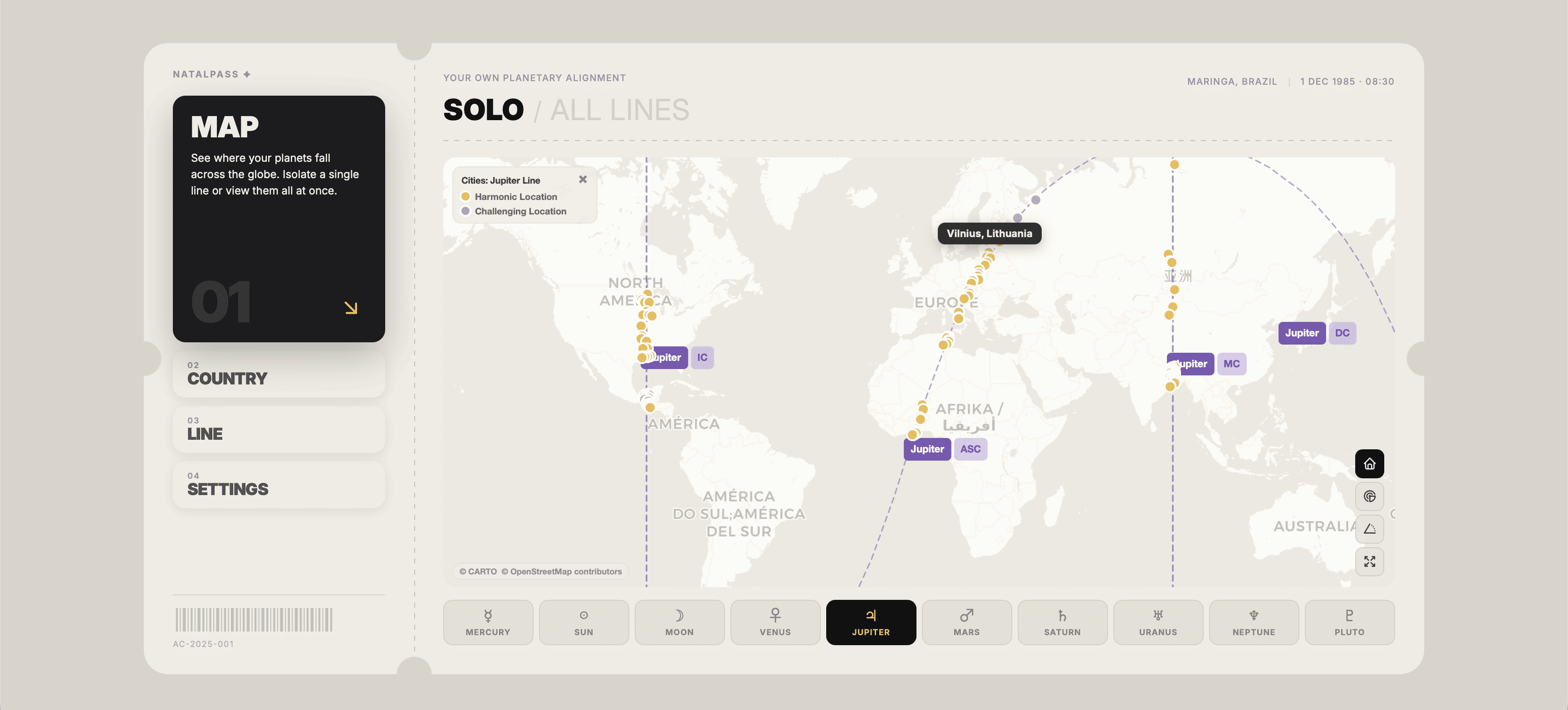
NatalPass map showing a planetary line with harmonic and challenging city dots along its path
Lines, aspects, and proximity — the same data a well-briefed AI needs to actually interpret a city.

The One-Click Briefing: What "Copy AI Prompt" Actually Sends

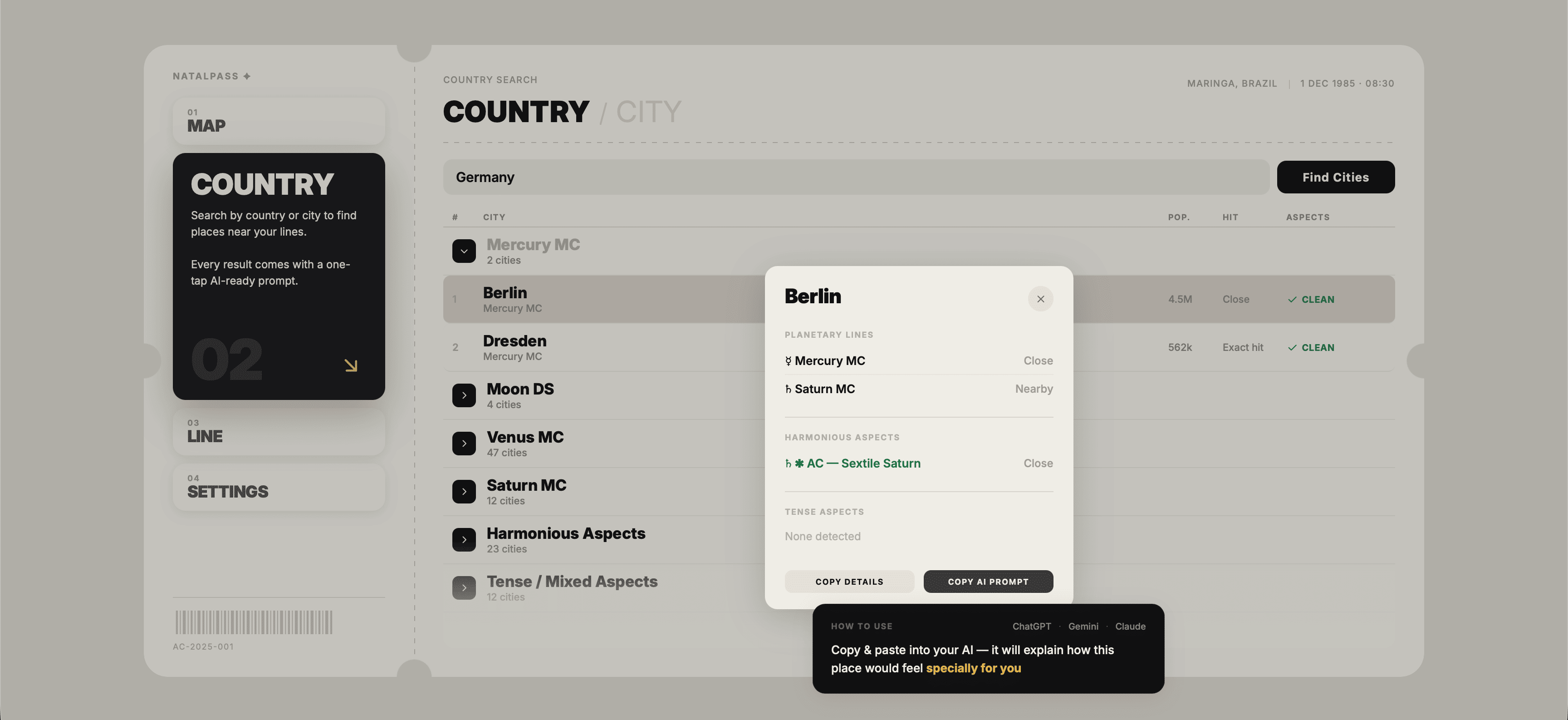
Open any city card on NatalPass — click a city on the map, in search results, or just type its name. Two buttons live there.

Copy Details grabs the city's astrological data, clean and ready to paste:

Budapest, Hungary

PLANETARY LINES
• Sun MC · Close
• Jupiter AC · Nearby

HARMONIOUS ASPECTS
• None detected

TENSE ASPECTS
• Square Lilith AC · Somewhat

Copy AI Prompt does much more. It takes that same data and builds a full briefing around it:

  • the lines and aspects near the city, with clear proximity labels (Direct Hit, Close, Nearby, Somewhat);
  • your complete natal chart, planet by planet — because a Sun MC line means something very different if your Sun is in the 12th house in Sagittarius versus the 10th house in Leo;
  • and a set of quiet instructions that make the AI behave like a thoughtful astrologer instead of a generic chatbot. It's told to connect each local line back to your natal placements first. To name the real psychological risks sitting in the tense aspects instead of politely ignoring them. And to end by asking what you'd like to explore next.

You just paste it into ChatGPT, Claude, Gemini — any model you like — and hit enter.

That's the entire workflow. No copying placements from a birth chart calculator, no formatting, no accidentally forgetting the tense aspect that could quietly ruin the experience six months later.

There's exactly one thing worth adding yourself — the one thing no tool can generate for you.

The One Sentence You Add: An Honest Goal

"I want to know if this city is good for my career" sounds specific. It isn't.

Take money: "I trade within the day — I need mental sharpness, fast decisions, steady nerves" points to one set of energies (Mercury and Mars territory). "I invest for years and my biggest enemy is impatience" points to a completely different one (Saturn and Jupiter). Same word — "money." Opposite cities.

Love asks for even more honesty. Which of these do you actually mean — not which sounds most acceptable?

  • You want to be adored. Pursued, spoiled a little, receiving more than you give for once.
  • You want a real partnership. The kind that deepens only when both people keep investing.
  • You want intensity. Magnetic, bright, maybe not forever — the chemistry you feel across a room. (Descendant lines, especially the charged ones, are famous for exactly this.)

None of these is wrong. But they light up different lines, and AI can only match a city to your real desire if you name the real desire — not the version edited for what anyone else would think. The chat is private. Skip the moral disclaimers.

The same applies to home ("deep roots and a kitchen that smells like mine" vs. "a base I can leave for months") and reinvention ("slowly become someone new" vs. "burn the old version down this year").

So after pasting the prompt, add one line: "My current goal: …" — and make it the honest version.

Why "Is Berlin Good for Me?" Is the Wrong Question

Because it forces AI to give a verdict, and verdicts about whole lives compressed into one word are always mush.

A city can be spectacular for your career and lonely for your heart. It can heal your body and stall your ambition. Ask "is it good" and AI has to average all of that into a polite non-answer — exactly the answer you got last time.

The NatalPass prompt ends by inviting your follow-up questions. That's where the real conversation starts — and the best follow-ups assume trade-offs exist:

  • "What would the first year here feel like emotionally?"
  • "Where is the friction in this city for me — the growth kind or the grinding kind?"
  • "What would this city ask of me, and what would it give back?"
  • "Which areas of my life would get louder here, and which would go quiet?"

That single shift — from verdict to trade-off — unlocks answers you can actually use.

NatalPass country search for Germany showing Berlin's city card grouped with other Mercury MC cities
Country search groups every line and aspect by country, city by city — no chat window required.

Deciding Between Cities: Three Practical Moves

The generated prompt reads one city deeply. These three add-ons cover everything else — and they all run on the same two buttons.

Compare two or three cities

Open each city's card, hit Copy Details for each, paste them all into one message, and add:

My goal: [YOUR HONEST GOAL]

My natal chart: [paste from any city's Copy AI Prompt]

Compare these cities honestly for my specific goal. Don't tell me both are nice — tell me what each would ask of me, what each would give back, and which trade-off fits better. Then tell me which you'd lean toward and why.

Why it works: comparison forces AI out of vague praise and into trade-offs.

Calibrate with cities you've already lived in

This is quietly the most powerful trick on this page. AI doesn't know how lines feel for you — but you have years of lived data. City cards exist for everywhere, including your past. Copy Details for two cities you've lived in, add one honest line of reality to each, then the new city:

[PAST CITY 1 details] — Reality: constant career opportunities, but I was anxious and slept badly for three years.

[PAST CITY 2 details] — Reality: peaceful and healing, but my ambition went completely quiet.

Now here's a city I'm considering: [NEW CITY details]. My natal chart: [PLACEMENTS].

Based on how the first two cities matched or didn't match their profiles for me personally, what does that suggest about the new one? What patterns do you see in how these energies express in my life specifically?

Why it works: your past cities become calibration points — AI extrapolates from your lived history instead of predicting from theory.

Stress-test one specific goal

After pasting a Copy AI Prompt, add:

My single priority right now is [VERY SPECIFIC GOAL — e.g., "a serious, equal, long-term relationship; I'm done with situationships"]. For this exact goal: does this city support it, complicate it, or redirect it into something else? Be honest if this city's energy pulls toward a different theme than the one I want.

Why it works: it gives AI permission to say "wonderful city, wrong goal" — better to hear it now than from your own life in eighteen months.

Where the Cities Come From in the First Place

One thing a chat can never do for you: find the candidates.

Ask AI for every city on your Venus AC and you get a short, hallucinated list. Run the same search on NatalPass and you get hundreds of real ones, grouped by country and sorted by population — or the honest answer that there aren't any, because sometimes a line really does run through open ocean, and knowing that beats an invented list.

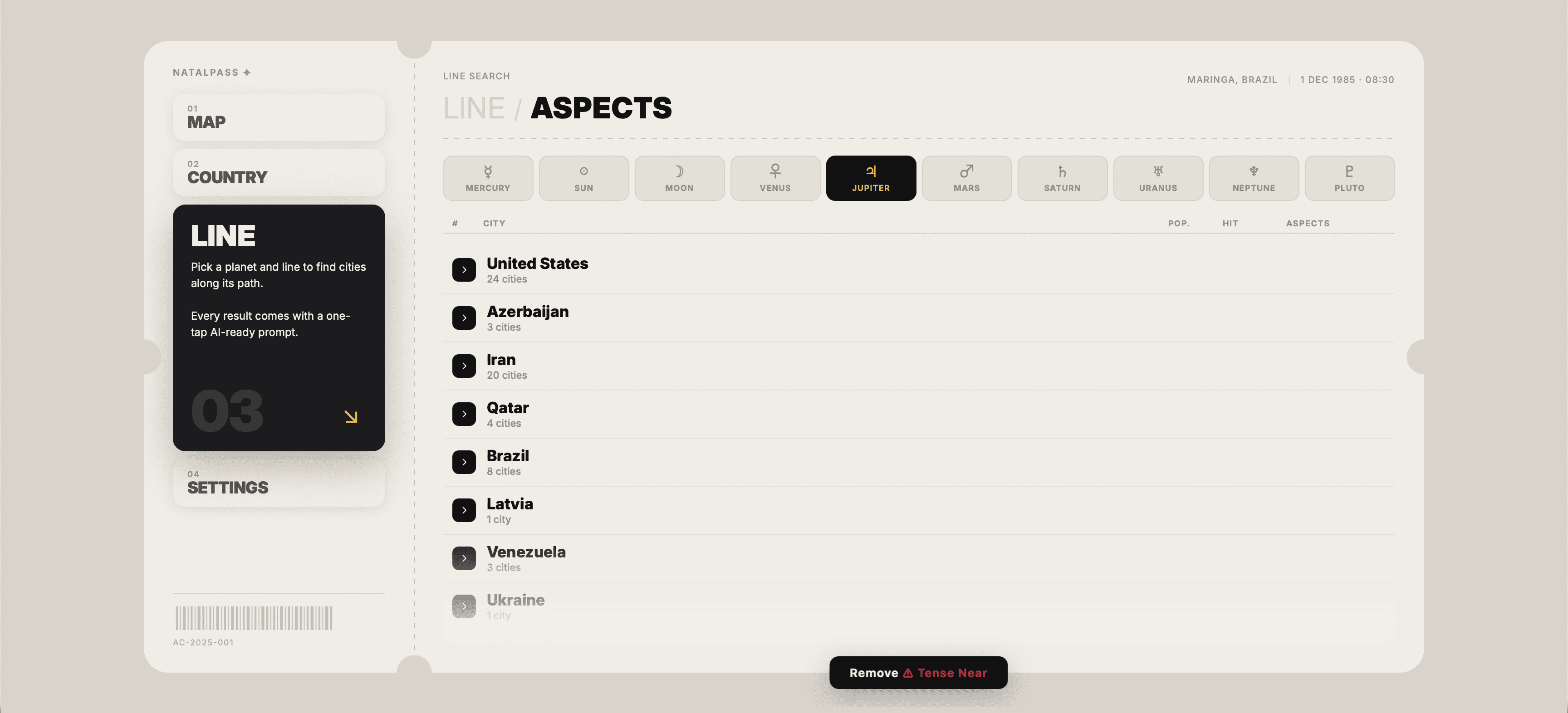
Prefer to start from a place? Type a country and see which lines and aspects cross it, with the cities grouped underneath. Flip on Remove Tense Near and everything close to a square or opposition drops out, leaving a clean shortlist. Or skip the search entirely and just look at the map. Sometimes your eyes catch patterns — three cities you've always been drawn to sitting quietly on the same line — before your mind can name them.

NatalPass aspect search with the Remove Tense Near filter narrowing results to clean cities
Remove Tense Near, available on line search, aspect search, and country search — one click to a cleaner shortlist.

AI Is a Smart Friend, Not an Oracle

A well-briefed AI can surface patterns and name trade-offs you might have already sensed. That's genuinely useful. But it's still your chart, your life, and your decision. Treat the output the way you would treat the opinion of a smart, well-informed friend: take it seriously, but don't hand over your own judgment.

FAQ: Using AI With Your Astrocartography Map

Can ChatGPT actually read my astrocartography map?

No, not by itself. AI can't see your map or calculate planetary lines. But if you give it accurate data — lines near a city, aspects with proximity, and your natal placements — it becomes surprisingly good at interpretation. The NatalPass Copy AI Prompt button packages all of that into one click.

Can AI tell me which cities sit on my planetary lines?

No. If you ask the same question in two different chats, you'll usually get two different lists. AI doesn't do the astronomical calculations — it improvises. Use a real astrocartography tool (like NatalPass) for finding cities, and AI only for interpreting them.

Will different AIs give me completely different answers?

Only if you give them vague or incomplete data. When you paste the same accurate information from a city card, ChatGPT, Claude, and Gemini tend to converge on very similar themes, warnings, and trade-offs. Good input produces consistent output.

What exactly does the NatalPass Copy AI Prompt include?

Three things: the planetary lines and aspects near the city, with proximity labels (Direct Hit, Close, Nearby, Somewhat); your full natal chart, planet by planet; and built-in instructions that make the AI synthesize properly instead of giving generic answers.

What's the difference between Copy Details and Copy AI Prompt?

Copy Details gives you just the raw astrological data for that city (lines + aspects + proximity) — useful for comparisons or custom prompts. Copy AI Prompt builds a complete, ready-to-use briefing, including your natal chart and instructions for the AI. Most people use this one.

How do I compare two or three cities using AI?

Open each city card, hit Copy Details on each, paste the data into one message, add your specific goal, and ask AI to compare them honestly — what each city would ask of you and what it would give back.

Should I include cities I've already lived in?

Yes. This is one of the strongest techniques. Copy the details of two past cities, add one honest sentence about how each actually felt, and AI can use that as a reference point before analyzing a new city. It dramatically improves the quality of the reading.

Do tense aspects really matter that much?

Yes — often more than the main line itself. A tense aspect sitting near an otherwise nice line is the most common reason a city feels strangely difficult after a few months. Both Copy Details and Copy AI Prompt include them automatically.